
Guided Meta ad strategies for Shopify
Pick a strategy.
We build the whole Meta campaign.
Choose the proven playbook that fits your store. Add your product, creative and budget once. Simple Ads builds the audiences, tailors the AI copy, and deploys the complete campaign into your own ad account.
- Choose by goal — not Meta jargon
- Product, creative & budget once
- Runs in your own ad account
Pick one strategy. We build the rest.
No blank campaign and no guessing which audiences belong together. Pick the proven structure that fits your store, fill in your inputs once, and Simple Ads turns it into a complete Meta Sales campaign.
- 1
Pick the right playbook
Choose by your goal and where your store is today — not by Meta jargon.
- 2
Add the basics once
Select the product and creative, connect your assets, and set one daily budget.
- 3
We build the campaign
Simple Ads creates the Sales campaign and every audience the strategy calls for.
Simple Ads handles
- Purpose-built audience structure
- AI copy tailored to each audience
- The right CBO or ABO budget setup
- Campaign, ad sets, creatives and ads
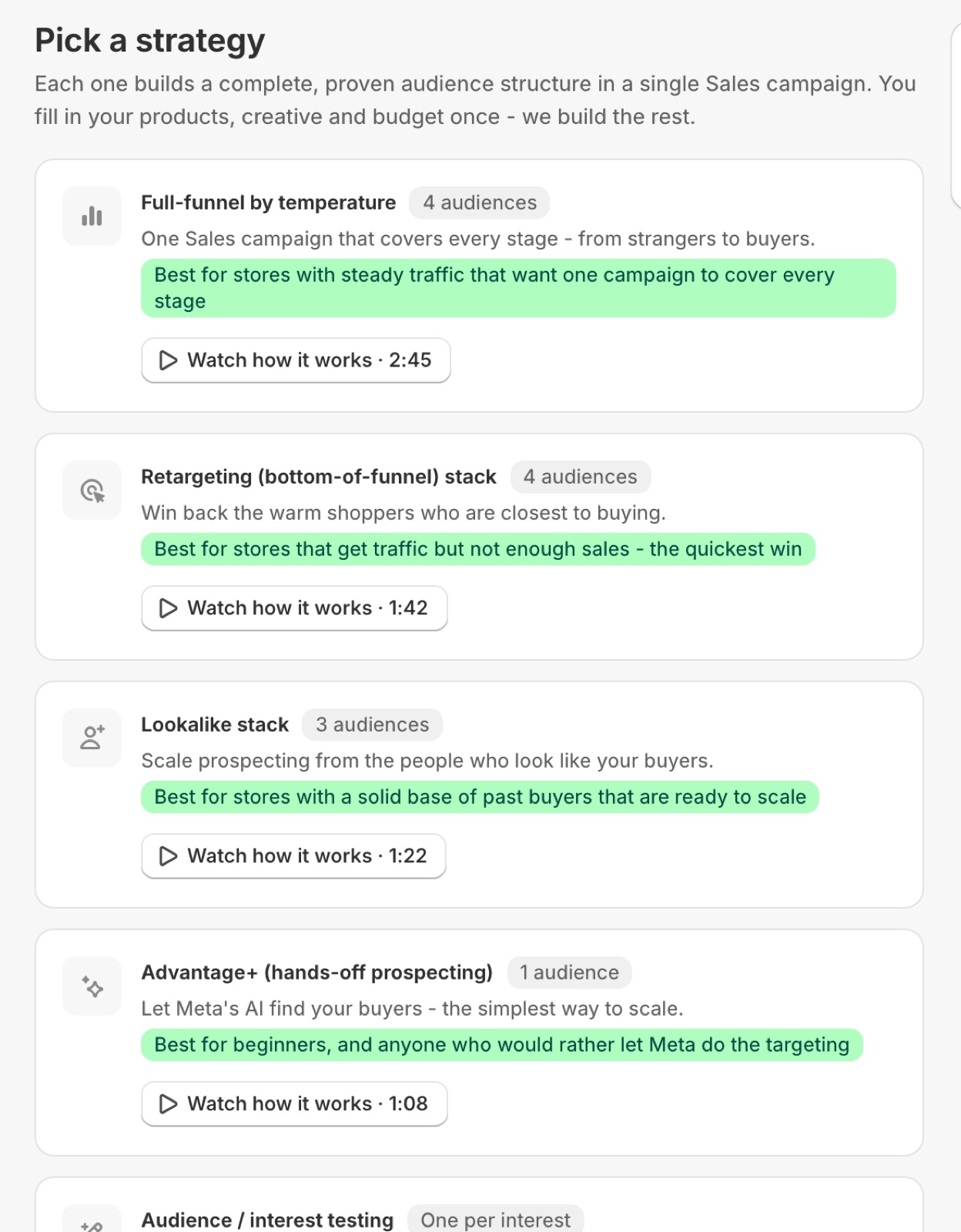
Full-funnel by temperature
One Sales campaign that covers every stage — from strangers to buyers.
Best for stores with steady traffic that want one campaign to cover every stage
Retargeting stack
Win back the warm shoppers who are closest to buying.
Best for stores that get traffic but not enough sales
Lookalike stack
Scale prospecting from the people who look like your buyers.
Best for stores with a solid base of past buyers
Advantage+ prospecting
Let Meta's AI find your buyers — the simplest way to scale.
Best for beginners who want the most hands-off setup
Audience / interest testing
Test interests fairly with an equal budget for each one.
Best for stores still finding their winning audience
Running Meta ads shouldn't take an agency and a lost afternoon.
Ads Manager is built for specialists. Between choosing a campaign structure, writing copy, guessing audiences and wiring up the pixel, most merchants either overpay an agency or never launch at all.
Simple Ads starts from the structure a media buyer would choose and fills it in for you — inside Shopify, in your ad account.
Hours in Ads Manager
A maze of nested settings just to get one campaign out the door.
Which structure?
Retargeting, lookalikes, Advantage+ — and no idea which belong in one campaign.
Blank-page ad copy
Staring at an empty text box, unsure what actually converts.
Guesswork audiences
No idea which interests or locations to pick — or how many people they reach.
Five guided steps, one live campaign
Want a single ad instead of a full strategy? The wizard carries you from product to launch — with a live ad preview the whole way.
Format & product
Single image, video or catalog — then pick products, or whole collections, with Shopify's own picker.
AI creative
Primary text, headline and description written from your product, with a live Facebook & Instagram preview.
Connect Facebook
Link your Business, ad account, Page, Instagram and pixel — or let Simple Ads create what's missing.
Audience & budget
Locations and interests searched live against Meta, a daily budget, and Meta's own reach estimate.
Launch
Review everything on one screen, then deploy the full campaign with a live log of every step.
Single image
A classic feed ad from one product — image, copy, headline and call to action.
Video
Upload a short MP4 or MOV; Simple Ads processes it with Meta and builds a native video ad.
Catalog
Advantage+ dynamic product ads — Meta decides which of your products to show each shopper.
Eight things you'd otherwise do by hand
Every one of these is a screen in the app today — not a roadmap item.
AI copywriter
Primary text, headline and description from the product you picked — in your store's own vocabulary. Regenerate any single field without touching the others.
Live Facebook & Instagram preview
The feed post, rendered as you type. Flip between Facebook and Instagram placements before anything ships.
Smart audience builder
Locations and interests searched live against Meta, AI-suggested keywords, and a reach estimate from Meta's own delivery API.
Auto asset setup & pixel detection
Missing a Business Manager, ad account or pixel? Simple Ads can create and wire it up — then check which pixel is really firing on your storefront.
Guided strategies
One form, a whole funnel: prospecting, warm engagers, lookalikes and retargeting inside a single campaign, with Meta's budget optimisation steering spend.
Scale toolkit
Lookalikes, audience split tests, fresh creatives and cost-guard automation — each set up against the ad set you choose.
ROAS dashboard & AI ad-health
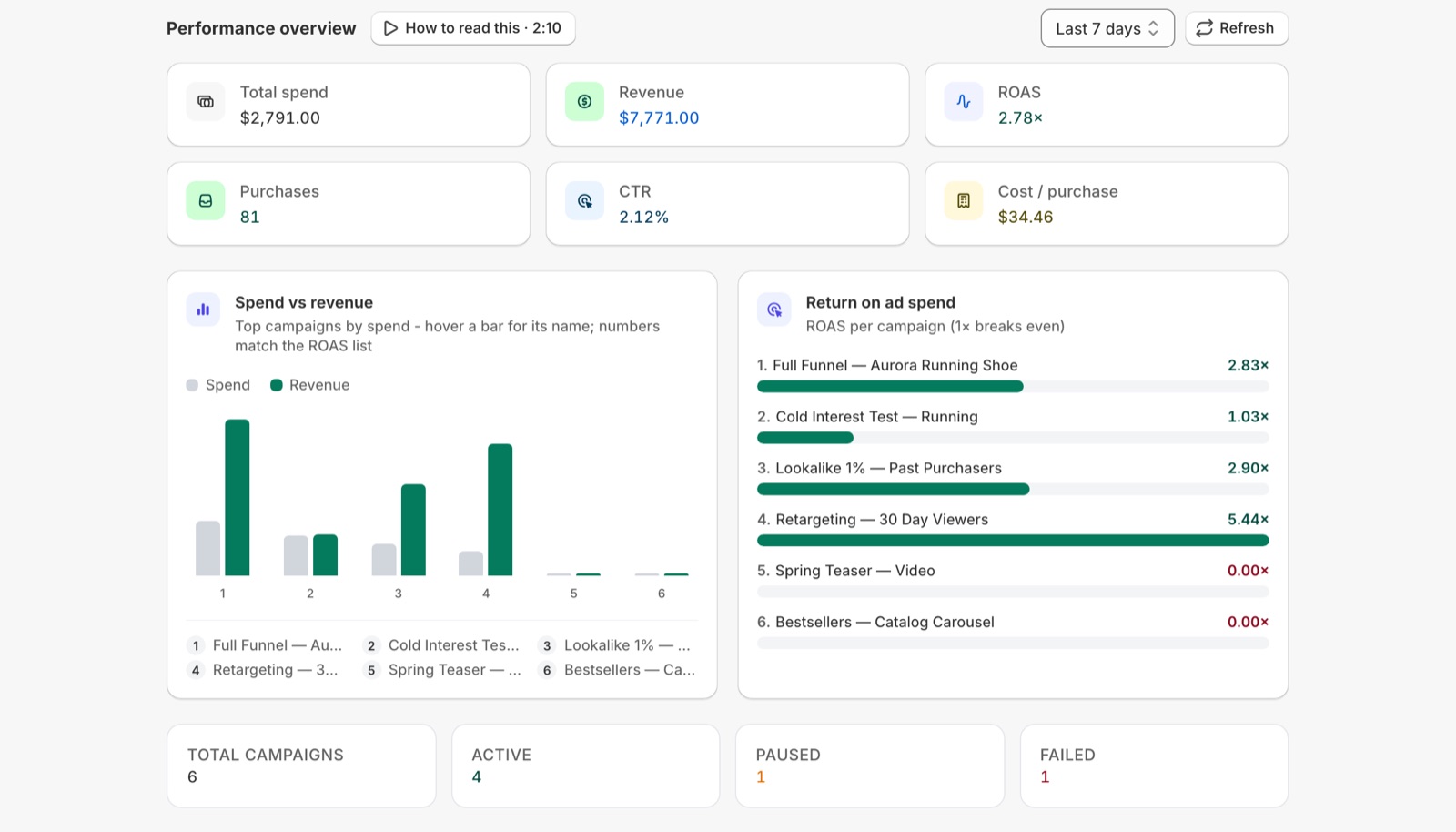
Spend, revenue, ROAS, CTR and cost per purchase for every campaign, plus a health read that says what to do about it.
One-click deploy
Campaign, ad set, creative and ad, created in your account in order — with a live log and the Meta object ID for each one.
Campaign
Sales objective, with the budget set up the way the strategy needs
Ad sets
One per audience — targeting, placements and optimisation
Ad creatives
Your product image or video, AI copy and UTM tags
Ads
Ready to serve on Facebook and Instagram
A complete campaign, deployed into your account.
Behind the Launch button, Simple Ads creates the real Meta hierarchy — campaign, ad sets, ad creatives and ads — and streams every step to a live log, with the Meta object ID for each one.
- Deploys to your own Meta ad account, never ours
- Every audience the strategy calls for, in one Sales campaign
- UTM tags on every ad, so Shopify attributes the revenue
- Every step logged live — success or error, in plain sight
Everything you launched, in one place.
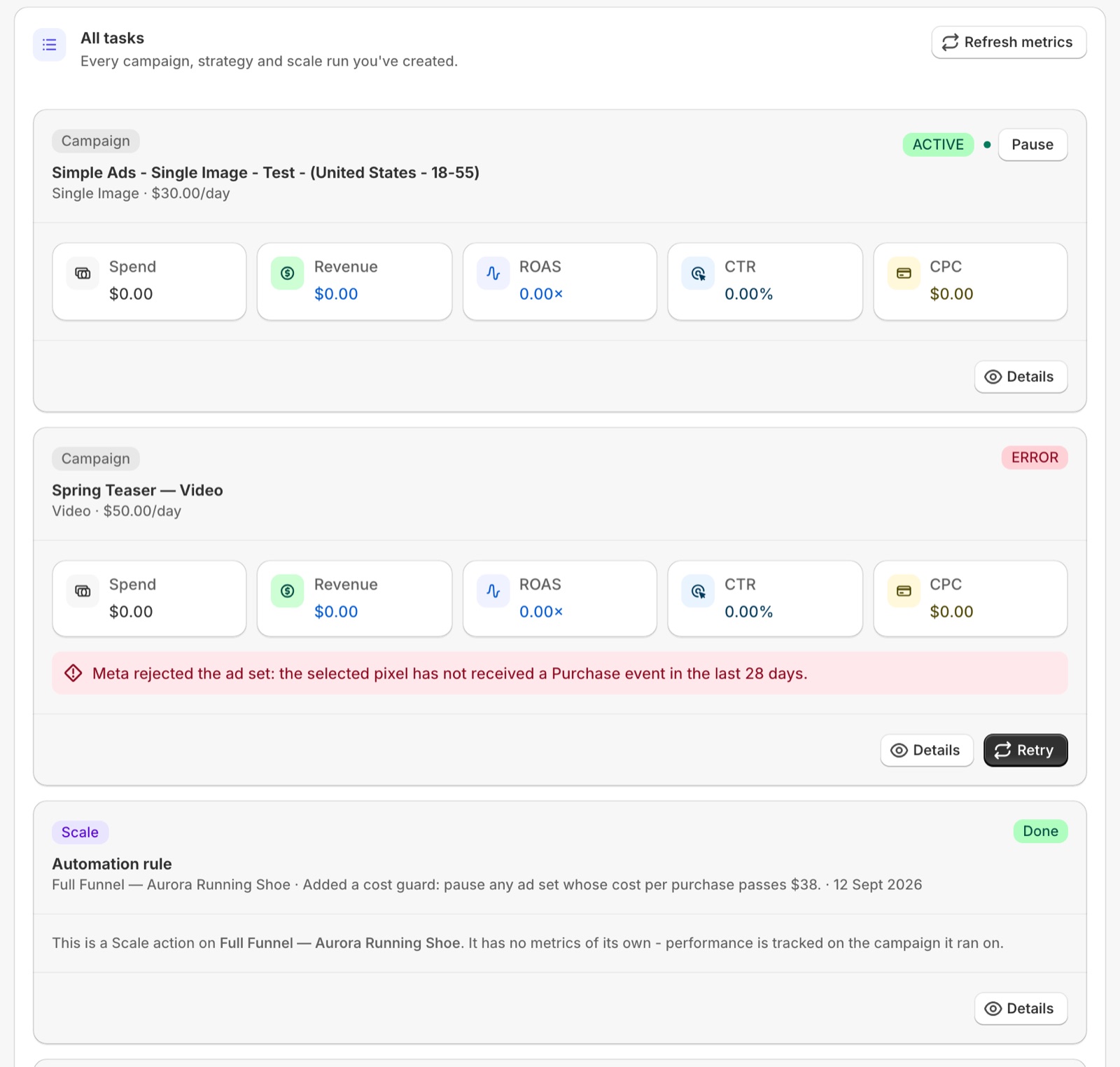
One list for everything you've launched
Every campaign, guided strategy and scale run in one Tasks view, with its live status from Meta. Pause or resume without opening Ads Manager.
Meta's errors, in plain English
When Meta rejects something, the reason it gave is shown on the task — with a Retry right beside it once you've fixed it.
Analytics for the ad account, pixel and Page
Spend, revenue, ROAS and cost per purchase over any period, compared to the one before — plus what your pixel and Page are doing.
Told when something is ready to scale
Campaigns returning at least 2× with repeat purchases are flagged, with the next move: raise the budget 20% at a time.
The four moves that come next.
Scale reads the campaigns already running in your ad account and builds on top of them. Pick a play; Simple Ads sets it up against the ad set you choose.
3 campaigns ready to scale
Returning at least 2× with repeat purchases — raise budgets by 20% at a time.
Example from a demo store.
Lookalike audiences
Find new audiences that behave like your best customers and prospects.
Split test audiences
Clone a winning ad set across locations, ages and interests to see what wins.
Test new creatives
Beat ad fatigue by dropping fresh creatives into ad sets that are already running.
Cost-guard automation
Let Meta pause anything that drifts past the cost per result you can afford.

Launch with Simple Ads. Measure with True ROAS AI.
Simple Ads tags every ad with clean UTMs; True ROAS AI reads them to attribute orders and reveal the real, after-cost profit of each campaign. Launch and truly measure — one studio, one loop.
Simple pricing. Every feature on both plans.
Two plans, both with every ad format, guided strategies and the Scale toolkit — the only difference is how many campaigns you run at once. Every plan starts with a free trial, and you always advertise from your own Meta ad account.
Basic
$34/month
Billed monthly · 7-day free trial
$24/mo for your first 2 months
$340/year
≈ $28/mo · 2 months free
Everything you need to run Meta ads from your store.
- Guided Strategies — build a full funnel in one flow
- All ad formats — single image, video & catalog
- Unlimited AI ad copy & audiences
- Scale toolkit — lookalikes, split tests, cost-guard automation
- Up to 5 active campaigns
- Email support
Pro
$59/month
Billed monthly · 7-day free trial
$590/year
≈ $49/mo · 2 months free
For stores running more than a handful of campaigns.
- Everything in Basic, plus:
- Unlimited active campaigns
- Priority support
Prices in USD. Every paid plan includes a 7-day free trial, is billed through Shopify on your regular store invoice, and can be upgraded, downgraded or cancelled at any time from inside the app.
Your Meta ad spend is separate — Facebook and Instagram always bill it directly to your own ad account. The plan covers the app only.
Questions, answered
Do I need my own Meta ad account?
Will you spend my money?
Do I need Facebook advertising experience?
What does Simple Ads actually create in my ad account?
Which ad formats can I run?
What happens if Meta rejects an ad?
Can I scale a campaign that's already working?
How much does it cost?
Is my data safe?
Does it work with True ROAS AI?

Pick a strategy. Launch today.
Install Simple Ads from the Shopify App Store and go from product to a complete Facebook & Instagram campaign in minutes — from $34/month after a 7-day free trial.